Smart Lock Data Ownership: Keep Control of Your Access Logs
By Ava Thompson • 28th Nov
When your smart lock tracks every entry and exit, smart lock data ownership becomes your frontline privacy defense, not a technical detail. Who controls your access log privacy? Is it you, or the company whose sensors guard your front door? As renters and homeowners increasingly confront hidden data pipelines, understanding where your door activity lives (and who can access it) is non-negotiable. Let's cut through the marketing claims with practical steps that put you back in charge.
Why Should I Care About Smart Lock Data Ownership?
Smart locks promise convenience but often trade it for silent surveillance. Many models automatically upload entry timestamps, user IDs, failed attempts, and even location data to cloud servers, creating detailed maps of your life. The EFF warns that lax smart lock data retention policies enable landlords to track tenant comings/goings without consent (see our GDPR smart lock compliance guide), while vendor breaches expose intimate patterns to hackers (as seen in recent Ring and Yale incidents). Worse, some systems retain data indefinitely, turning your access logs into permanent digital footprints. If your lock requires a cloud account for basic functions, you have already surrendered control.
Secure the door; simplify the tech. Always prioritize mechanical reliability before adding digital layers.
How Do I Actually Control My Access Logs?
True user control of access logs means three non-negotiables: local storage, transparent retention rules, and zero mandatory sharing. Start by checking your lock's settings for these features:
- Local-only data storage: Your entry history should default to staying on the device (like SwitchBot's on-lock encryption), not syncing to the cloud. If logs must go online, there should be an option to disable this.
- Clear retention timelines: Does your lock auto-delete logs after 30 days? 90? Never? Look for brands like Lockly that purge cloud data immediately upon account deactivation, unlike others that retain years of timestamps.
- No hidden sharing: Verify privacy policies forbid selling data to "partners" (a common loophole). NYC's smart lock law sets the gold standard: landlords cannot harvest tenant data without explicit opt-in consent.
If your lock forces cloud backups, disable remote features entirely, it will still work locally. For models proven to work without the cloud, see our offline smart locks guide. Physical security always trumps "smart" convenience. I once helped a neighbor whose misaligned strike plate froze solid during a blizzard; no amount of cloud data would've unlocked that door until we fixed the mechanics.
What Privacy-First Locks Actually Exist?
Not all smart locks treat data equally. Seek these specific privacy-first lock data handling markers:
- No account required for core functions: Biometric unlocks or keypad codes should work without linking to a cloud profile (Lockly's fingerprint system does this). If setup demands an email or phone number, skip it.
- On-device analytics only: Brands like Yale Assure Lock 2 now offer local-only modes where access logs never leave your home network.
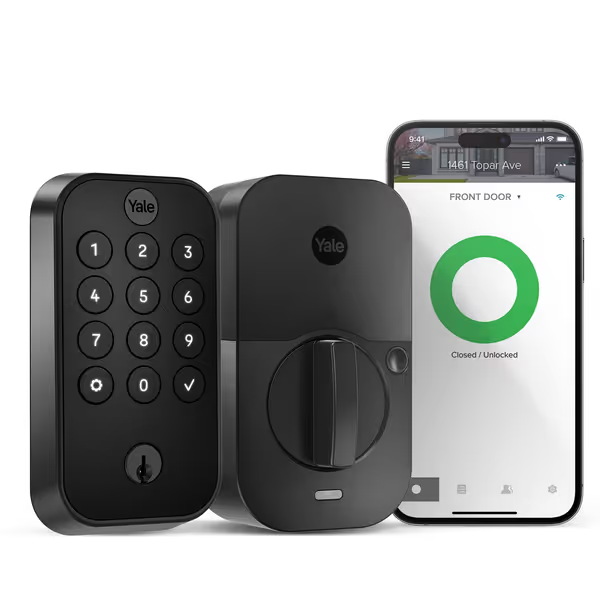
Yale Security Assure Lock 2 Deadbolt
Effortless key-free entry with remote access and auto-locking for peace of mind.
$199.98
4
Connectivity2.4 GHz Wi-Fi
Connectivity2.4 GHz Wi-Fi
Pros
DIY installation, replaces existing deadbolt with screwdriver.
Auto-Lock feature ensures your door is always secured.
Cons
Short battery life (as little as 2.5 weeks reported).
Customers find the smart lock easy to install with clear instructions and appreciate its high-quality construction. The connectivity and functionality receive mixed feedback - while the app works well with HomeKit, some report WiFi connection issues, and though the lock portion functions reliably, some units stop working completely. Moreover, the battery life is problematic, with batteries lasting only 2.5 weeks, and the auto-lock feature has mixed results, with some customers successfully controlling it from their phones while others report it fails to auto-unlock.
Customers find the smart lock easy to install with clear instructions and appreciate its high-quality construction. The connectivity and functionality receive mixed feedback - while the app works well with HomeKit, some report WiFi connection issues, and though the lock portion functions reliably, some units stop working completely. Moreover, the battery life is problematic, with batteries lasting only 2.5 weeks, and the auto-lock feature has mixed results, with some customers successfully controlling it from their phones while others report it fails to auto-unlock.
- Transparent deletion workflows: Can you instantly nuke all logs from the device? Or must you beg customer support? Test this before buying.
Avoid locks that "require Wi-Fi for setup" or boast "advanced usage analytics", these are red flags for invasive smart lock data sharing practices. If you're unsure which radios expose what data, compare Z-Wave vs Wi-Fi vs Bluetooth to pick a privacy-friendly protocol. As one renter told me: "I don't need my landlord knowing when I sneak in after midnight." Especially when they're using systems that track guest visitors too.
Aren't Physical Security Basics More Important?
Absolutely. Before obsessing over data, secure the door itself. No amount of local data storage helps if your deadbolt jams or the strike plate pulls loose (exactly what happened during that blizzard close call). Prioritize:
- ANSI/BHMA Grade 2 hardware: Cheaper locks fail under stress. Grade 2 deadbolts withstand 10+ strikes, critical when tech fails—see our ANSI/BHMA grades explained for what the ratings mean.
- Strike plate alignment: Misaligned plates cause 70% of "smart lock freeze" complaints I see. Use a business card to check spacing; gaps wider than 1/8" invite malfunction.
- Latch torque testing: Yank your door handle hard while the lock engages. If it drags or sticks, no smart system will work reliably. Adjust spindle tolerance before adding electronics.
Physical hardening isn't glamorous, but it's why my neighbor's offline keypad kept working when cloud-dependent locks failed in -20°F. Secure the door first; then add brains that respect privacy.
What's My First Action Step?
Tonight, do this:
- Disable cloud backups in your lock's app (search "local mode" or "offline access")
- Delete old access logs, set auto-purge to 30 days max
- Physically test your door: Close it slowly. Does the latch engage smoothly? If not, realign the strike plate now.
If your lock lacks these options, it's time to explore renter-friendly retrofits. Start with our no-drill smart lock picks for renters to avoid lease issues and keep data local. Brands like Yale Assure Lock 2 (Wi-Fi model) let you toggle between local and cloud modes, keeping your data in your home while maintaining keypad convenience. No drilling, no landlord drama, just true control. Remember: convenience without consent is just surveillance with extra steps. Your front door should protect your privacy, not profit from it.
Related Articles