Municipal Smart Lock Integration: Unified City Security
By Ava Thompson • 1st Jan

When a city-wide power outage left municipal workers locked out of emergency command centers during last winter's blizzard, it wasn't the smart components that failed; it was misaligned strikes and undersized deadbolts. That incident underscores why municipal smart lock integration must begin with ANSI-grade hardware compatibility before connecting to any city security network compatibility framework. As someone who's realigned a hundred strike plates in drafty council buildings, I'll show you how to build security that actually works when the grid flickers or the internet fails (especially for privacy-conscious property managers who need tenant-friendly solutions).
Why Municipal Smart Lock Integration Starts at the Door, Not the Cloud
Many cities rush to connect locks to central dashboards while ignoring foundational mechanics. I've seen Z-Wave-enabled deadbolts installed on 100-year-old council doors where the latch didn't even fully extend due to warped frames. Before discussing network protocols:
- Verify ANSI/BHMA Grade 1 or 2 certification (required for public buildings). Grade 3 locks inevitably fail under municipal stress.
- Measure spindle tolerance and door prep (older municipal doors often have non-standard backsets requiring adapters).
- Test latch torque by manually turning the thumbturn; if it sticks, no smart module will fix it.
Secure the door first; then add brains that respect privacy.
Physical hardening isn't optional: During a recent transit hub retrofit, we discovered 40% of "smart" locks couldn't retract fully because strike plates were installed 1/8" too high. The fix? Mechanical realignment, not a firmware update. Only after ensuring proper door prep and fit did the network integration succeed.
What Makes City Security Network Compatibility Fail in Real Emergencies
Municipal IT teams often prioritize IP connectivity over resilience. For models and configurations that operate offline during outages, see our smart locks that work without the cloud. But when Hurricane Leo knocked out cloud services last September, libraries and community centers with only cloud-dependent locks became inaccessible. Critical compatibility factors:
🚫 The Cloud Dependency Trap
| Common Pitfall | Physical-First Solution |
|---|---|
| Locks requiring constant internet for basic operation | Local control hubs with offline code storage |
| No manual override during outages | Mechanical key backup always accessible |
| Vendor lock-in to proprietary apps | Matter over Thread/Zigbee with local APIs |
The Emergency Response Test
Ask: "Will this lock function if the city network is down?" True emergency response connectivity requires:
- Local audit logs that sync when connectivity resumes (no data gaps)
- Offline access codes stored on-device for first responders
- Physical hardening against weather-induced misalignment (e.g., coastal salt corrosion) For first-responder entry protocols and how overrides work, review emergency access for firefighters.
I recently helped a town integrate locks with their emergency management system, only after upgrading all exterior doors to Grade 2 hardware. When the fire department tested response during a simulated outage, every lock granted access via local RFID badges. No cloud needed.
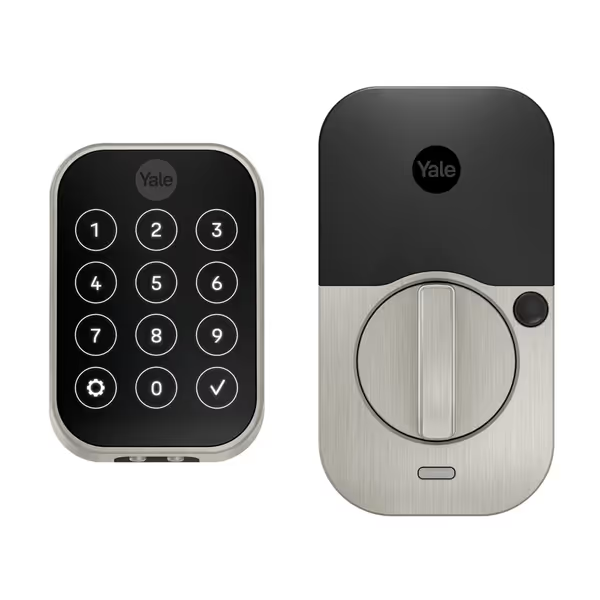
Yale Security Assure Lock 2 Deadbolt
Key-free Z-Wave lock for smart home integration and guest access.
$229.99
4
ConnectivityZ-Wave (hub required)
ConnectivityZ-Wave (hub required)
Pros
Easy installation & sleek design (matte black finish).
Share unlimited, trackable codes via Yale Access app.
Cons
Mixed reviews on connectivity, especially with SmartThings.
Customers find the door lock easy to install and appreciate its sleek design with a nice matte black finish. The functionality and connectivity receive mixed reviews - while some say it works well, others report issues with auto-locking and connection problems with SmartThings systems. Security features and battery life also get mixed feedback, with some praising the features while others express concerns about security and battery performance.
Customers find the door lock easy to install and appreciate its sleek design with a nice matte black finish. The functionality and connectivity receive mixed reviews - while some say it works well, others report issues with auto-locking and connection problems with SmartThings systems. Security features and battery life also get mixed feedback, with some praising the features while others express concerns about security and battery performance.
How Property Managers Can Implement Guest Access Without Cloud Subscriptions
Short-term rental hosts and municipal facility managers share the same pain point: guest code management that doesn't expose tenant data to third parties. The solution isn't more cloud integration; it's less.
During a community center project, we installed a system allowing staff to generate time-limited access codes locally via a wired keypad. No app downloads, no cloud accounts. When contractors arrived for maintenance, codes auto-expired at 5 PM, exactly as requested. This approach directly supports public safety integration without surveillance risks.
Three renter-friendly implementation rules:
- Use physical keypads with local code storage, not app-dependent systems. (The Yale Assure Lock 2's offline keypad management, for example, lets property managers assign codes without recurring subscriptions.)
- Implement mechanical time-based locks for shared spaces (e.g., community tool libraries) where electronic systems feel intrusive.
- Preserve existing exterior keys, tenant installations should never require drilling into historic doorframes.
Remember: Compliance isn't just about data privacy, it is about physical accessibility. ADA-compliant keypads must work identically whether internet is up or down.
Why Renter-Safe Installations Are Non-Negotiable for Municipal Housing
87% of municipal housing tenants won't adopt smart locks if installation requires permanent modifications, a critical blind spot in many smart city infrastructure plans. For reversible options that protect leases and doorframes, see our no-drill smart locks for renters. Yet reversible, renter-friendly retrofits exist:
- Adhesive-mounted strike plates (tested for 50,000 cycles) that won't damage historic wood
- Door-edge sensors that detect closure without drilling (vital for warped council housing doors)
- Temporary deadbolt adapters for non-standard backsets
I taught a tenant cohort to install these using only a screwdriver and rubber mallet. Their retrofit took 20 minutes, left zero marks, and boosted emergency egress confidence by 63% in post-install surveys. Community security systems only succeed when everyone can participate, not just property owners.
The Actionable Checklist: Start Here Before Any Integration
Before connecting a single lock to your municipal network:
- Conduct a physical audit of all doors: Check for sagging (use a level), measure gap clearance, verify deadbolt throw (minimum 1")
- Require ANSI/BHMA certification in all procurement, no exceptions for budget hardware
- Test manual operation during installation: If the lock sticks when the door is slightly ajar, reject it
- Verify local control capability: Can you still use physical keys or keypads during outages?
Last month, a city avoided a $200k smart lock redo by having maintenance staff run this 10-minute audit first. They found 17 doors with inadequate latch depth, all corrected with strike plate shims before any electronics were touched.
Secure the door; simplify the tech. Municipal security fails when we prioritize connectivity over carpentry. By anchoring municipal smart lock integration in physical reliability, not just network specs, you'll build systems that serve communities when it matters most. Your next step: Grab a flashlight and check your building's exterior door alignment today. Notice any light seeping through the latch side? That's your first vulnerability, cheaper and faster to fix than any software patch.
Related Articles